
Why Isn’t Google Indexing My Pages and How Do I Fix It?
TL;DR: If your pages aren’t showing up in Google search results, you have an indexability problem. This means Google either can’t find your pages, doesn’t understand them, or has decided they’re not worth storing. The fix involves checking Google Search Console for specific errors, removing technical blockers like noindex tags and robots.txt restrictions, improving content quality, and strengthening internal linking. Most indexing issues are fixable within a few weeks, and solving them can mean the difference between zero organic traffic and thousands of monthly visitors that translate directly into revenue.
You’ve done everything right. You researched keywords, wrote helpful content, hit publish, and waited. Days turn into weeks. You search Google for your article title and… nothing. Your page doesn’t exist as far as Google is concerned.
So you open Google Search Console, and there it is: “Crawled – currently not indexed.”
What does that even mean? You spent hours on that content. Your site is live. The page loads perfectly fine when you visit it. But Google just ignores it like you never published anything at all.
Here’s the thing. This happens to almost everyone at some point. I’ve seen sites with 50 pages where only 12 were indexed. I’ve seen bloggers publish weekly for six months and wonder why traffic stayed flat. The answer almost always comes down to indexability.
And here’s why this matters for your income: if Google doesn’t index your pages, those pages cannot rank. If they can’t rank, they get zero organic traffic. Zero organic traffic means zero affiliate commissions, zero ad revenue, zero leads. You’re essentially creating content that lives on your server and nowhere else.
Let’s fix that.
What Does Indexability Actually Mean?
Before we get into solutions, let’s make sure we’re speaking the same language. Indexability is simply whether Google can successfully analyze, store, and show your page in search results. Think of Google like a massive library. Indexability determines whether your book gets added to the shelves where people can find it, or whether it sits in a warehouse where nobody will ever see it.
But here’s where people get confused. There’s a difference between crawlability and indexability, and understanding both is crucial.
Crawlability is about discovery. Can Google’s bots physically access your page? Can they follow links to find it? Can they read the content once they arrive? If a page isn’t crawlable, Google doesn’t even know it exists. It’s like your book never made it to the library’s front door.
Indexability is about inclusion. Once Google has crawled your page and read the content, does it decide your page deserves a spot in the index? This depends on technical factors like meta tags and canonical URLs, but it also depends heavily on whether Google thinks your content is valuable enough to store.
Both matter enormously. Crawlability opens the door. Indexability determines whether you get to stay inside.
Here’s a real world example of why this matters for your wallet. Let’s say you run an affiliate site reviewing camping gear. You’ve written a comprehensive 3,000 word guide on the best backpacking tents. If that page isn’t indexed, it cannot rank for “best backpacking tents” or any related keywords. That single page could drive 2,000 monthly visitors and generate $800 per month in affiliate commissions. But if Google never indexes it, you earn exactly zero dollars from all that work.
How Does Google Decide What Gets Indexed?
Understanding Google’s process helps you diagnose problems faster. The search engine doesn’t blindly index everything it finds. It discovers pages, evaluates them, and makes decisions about which ones deserve storage. Here’s how the pipeline works.
Discovery is the first stage. Googlebot (that’s Google’s web crawler) identifies that your page exists. This usually happens through internal links from other pages on your site, links from external websites, or your XML sitemap. If Google can’t discover your page, it never enters the indexing pipeline at all.
This is why internal linking matters so much. Every important page on your site needs to be linked from somewhere. If you publish a new blog post and it’s not linked from your homepage, categories, or other related content, Google might take weeks or months to find it. Some pages never get found at all.
Rendering comes next. This is where things get technical, but stay with me. When Googlebot visits your page, it needs to process all the content, including any JavaScript that loads dynamically. If your page uses heavy JavaScript frameworks and the content doesn’t load properly for Google’s crawler, the search engine might see a blank page even though humans see your full content.
This especially matters for sites built with React, Angular, or Vue. If critical content only loads after JavaScript executes and Google can’t render it properly, your page might as well be empty. The solution is server-side rendering (SSR), which means your server generates the full HTML before sending it to the browser. That way Google sees everything immediately without waiting for JavaScript to run.
Canonicalization is Google’s way of handling duplicate content. If your site has multiple URLs showing similar or identical content, Google picks one version to index and ignores the others. For example, your homepage might be accessible at yoursite.com, www.yoursite.com, yoursite.com/index.html, and yoursite.com/home. Those are all technically different URLs, but they show the same content.
You tell Google which version to prefer using canonical tags. These are small pieces of code in your HTML that say “this is the main version of this page.” Get this wrong, and Google might index the wrong URL or skip your page entirely.
Finally, there’s the actual indexing decision. Google looks at technical signals like your robots.txt file and meta tags, but it also evaluates content quality, relevance, and uniqueness. Pages that don’t meet Google’s standards might be crawled but never indexed. This is increasingly common as Google becomes more selective about what it stores.
What Causes the Most Common Indexing Problems?
Let me walk you through the issues I see most often when helping people diagnose why their pages aren’t indexed. Most of these are fixable within a day once you know what to look for.
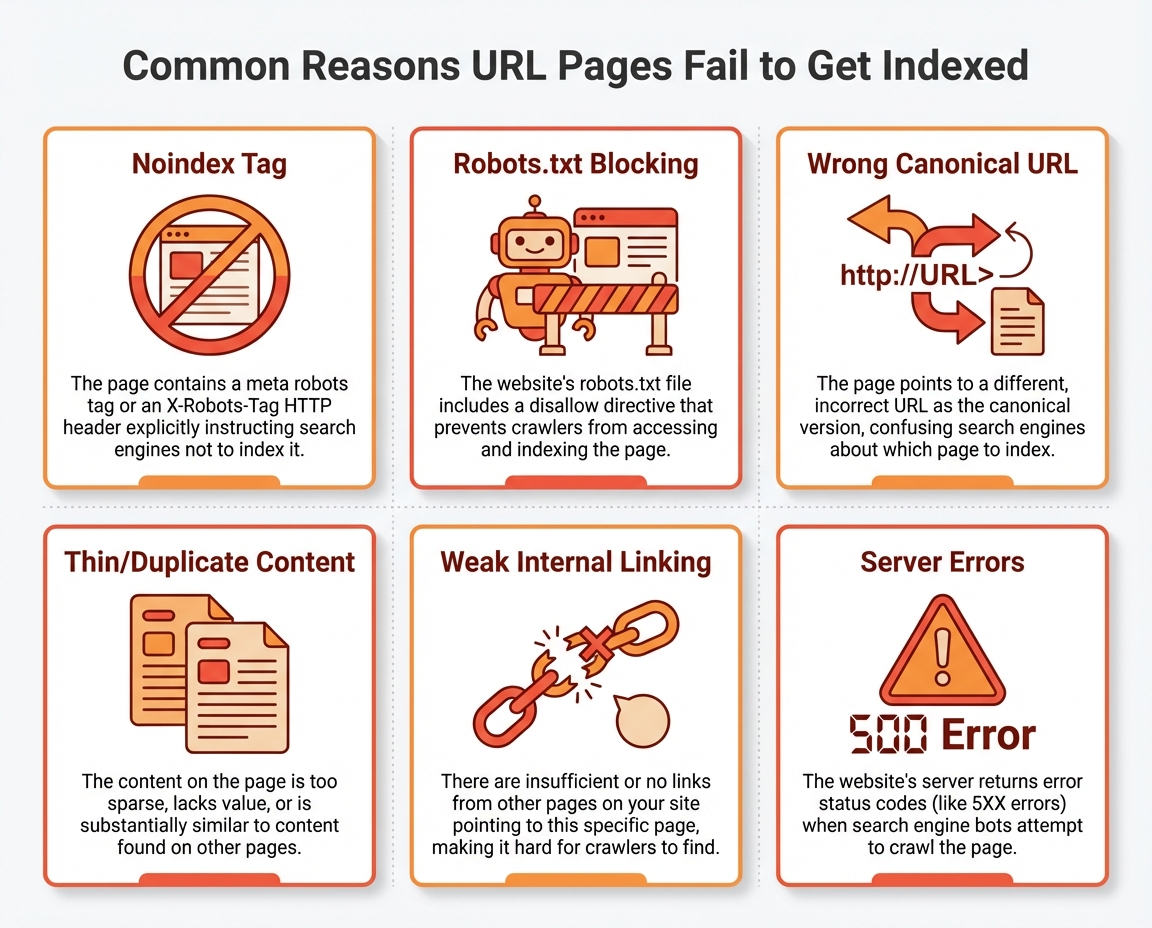
The noindex tag is the most common culprit. This is a piece of code that tells Google “don’t index this page.” It looks like this in your HTML: meta name=”robots” content=”noindex”. Sometimes this gets added intentionally for pages like thank you screens or login pages. But during site launches, redesigns, or theme changes, noindex tags sometimes get applied to templates that should be indexable. I’ve seen entire blogs accidentally noindexed because a developer left a checkbox checked during staging.
Always check your high value pages manually. View the page source, search for “noindex,” and make sure it’s not there unless you want that page excluded.
Your robots.txt file can also cause problems. This file lives at yoursite.com/robots.txt and tells search engine crawlers which parts of your site they’re allowed to access. If you accidentally block important directories like /blog/ or /products/, Googlebot can’t crawl those pages at all.
Here’s the tricky part. Blocking crawl access doesn’t stop Google from knowing a URL exists. If another page links to that URL, Google discovers it but can’t read it. The result? Google knows about your page but can’t evaluate it for indexing. You can test your robots.txt using Google Search Console’s tester tool to make sure you’re not blocking anything important.
Canonical tag mistakes send confusing signals to Google. If your page’s canonical tag points to a different URL, Google thinks the other URL is the main version and might not index yours. This happens when filters, parameters, or CMS settings automatically generate wrong canonical URLs.
For example, if yoursite.com/blue-shoes has a canonical pointing to yoursite.com/shoes instead of itself, Google might decide to index only the general shoes page and skip the blue shoes page entirely. Every important page should have a self-referencing canonical (pointing to its own URL) unless you intentionally want to consolidate multiple pages into one.
Thin content is becoming an increasingly common reason for indexing failures. Google doesn’t want to waste storage space on pages that don’t offer unique value. Pages with minimal text, repeated descriptions across multiple URLs, or templated layouts that don’t add anything useful often get crawled but never indexed.
This hits ecommerce sites especially hard. If you have 10,000 product pages and 8,000 of them have identical one paragraph descriptions copied from manufacturers, Google might index only a fraction of those pages. The solution is adding unique, helpful content to each page, but that obviously takes significant effort for large sites.
Duplicate content confuses Google about which page to index. When the same or very similar content appears on multiple URLs, Google tries to pick one authoritative version. Sometimes it picks wrong, and sometimes it just gives up and skips all versions.
Internal linking problems prevent Google from finding your content. Pages that are buried four or five clicks deep from your homepage get crawled less frequently. Orphan pages that have zero internal links pointing to them might never be crawled at all. Google’s John Mueller has said that indexing can take anywhere from several hours to several weeks, but pages with weak internal linking often take even longer or never get indexed.
Server errors and redirect loops waste Google’s limited time on your site. If pages return 500 errors (server problems) or get stuck in redirect chains that never resolve, Googlebot gives up and moves on. These issues affect what SEOs call your “crawl budget,” which is essentially how much time and resources Google allocates to crawling your site.
How Do You Diagnose Indexing Issues?
Google Search Console is your best friend here. It shows exactly which URLs Google has indexed, which ones it skipped, and specific reasons why.
Start with the Page Indexing report (previously called Index Coverage). This shows how many pages on your site are indexed versus excluded. You’ll see a count at the top, plus tables breaking down exactly why pages weren’t indexed.
Look for these common status messages. “Crawled – currently not indexed” means Google found your page, read the content, but decided not to add it to the index. This usually indicates a content quality issue. Google doesn’t think your page offers enough unique value to deserve storage.
“Discovered – currently not indexed” means Google knows your page exists but hasn’t actually crawled it yet. This often points to crawl budget issues or weak internal linking. Google found the URL but hasn’t prioritized visiting it.
“Excluded by noindex tag” means exactly what it sounds like. Your page has a noindex directive, whether intentional or not. If this shows up on pages you want indexed, you need to find and remove that tag.
For individual pages, use the URL Inspection tool. Enter any URL and Google tells you whether it’s indexed, whether it can be crawled, and which canonical version Google has selected. If you’ve fixed an issue, you can request reindexing directly from this tool.
Beyond Search Console, check your XML sitemap. This is your roadmap for Google, showing which pages you want crawled. Make sure it only includes canonical, indexable URLs. No redirects, no 404 errors, no duplicates. Tools like Screaming Frog can compare your sitemap against what’s actually indexed to find gaps.
For serious diagnosis, analyze your server logs. This shows exactly which pages Googlebot actually requested, how often, and what response it received. If your most important URLs rarely appear in the logs, Google isn’t prioritizing them. Log analysis tools can filter by user agent to isolate crawler activity specifically.
How Do You Fix Indexing Problems?
Now we get to the practical stuff. Here’s how to actually solve these issues.
First, prioritize which pages actually need to be indexed. Not every page deserves a spot in Google’s index, and that’s okay. Focus on pages that contribute to your business goals: revenue generating pages like products or affiliate content, evergreen educational content that builds authority, and high traffic landing pages that bring new visitors.
For a travel site, your comprehensive “Tokyo travel guide” deserves indexing priority over a temporary “Black Friday deals” page. Map your priority pages against the Page Indexing report and focus fixes where visibility matters most.
Fix canonical tag issues by ensuring every important page points to the correct canonical URL. Watch for conflicting canonicals where pages point to each other instead of establishing one clear source. Check for cross-domain canonicals that might accidentally send authority to another site. Use self-referencing canonicals (where the canonical URL matches the actual page URL) unless you intentionally want to consolidate pages.
Use robots.txt and meta robots correctly. Remember that robots.txt controls crawling while meta robots controls indexing. They’re not the same thing. Use robots.txt to block technical folders like admin areas or search results pages. Use noindex for pages that serve users but shouldn’t appear in search results, like thank you pages after form submissions.
Critical warning here: if you block a page in robots.txt, Google can’t even see a noindex tag on that page. So never block pages in robots.txt that you intend to noindex. Google will keep the URL in its queue and try to crawl it repeatedly without ever getting the signal to stop indexing attempts.
Handle parameter URLs and faceted navigation carefully. Ecommerce sites often generate hundreds of near-identical URLs from filters. One URL for red shoes size 8, another for red shoes size 9, another for red shoes sorted by price. These eat crawl budget without adding search value.
Ask yourself whether each filter combination serves unique search intent. Usually the answer is no. Consider noindexing filter variations while keeping main category pages indexed. Clear rules help Google focus on what actually matters.
Consolidate duplicate content using 301 redirects when possible. If you have two blog posts covering basically the same topic, redirect the weaker one to the stronger one. When you can’t merge pages, use canonical tags to tell Google which version is primary. The other version still exists for users but signals to Google where to focus indexing attention.
Strengthen internal linking throughout your site. Pages buried deep in your architecture get crawled less frequently. Important pages should be linked from your main navigation, from high traffic blog posts, and from contextual anchor text within related content.
If your pricing page is only linked from one obscure dropdown menu, add links from your homepage and top level navigation. Every click away from the homepage makes a page harder for Google to find and less likely to be indexed promptly.
How Does Indexing Affect Your Income?
Let me put real numbers on this so you understand the stakes.
Say you run a content site monetized with display ads paying $25 RPM (revenue per thousand visitors). You have 100 blog posts, but only 60 are indexed. Those 60 indexed pages bring 20,000 monthly visitors and generate $500 per month.
If you fix indexing issues and get all 100 pages indexed, assuming similar traffic potential, you might reach 33,000 monthly visitors and $825 per month. That’s an extra $325 monthly, or nearly $4,000 per year, just from fixing technical problems.
For affiliate sites, the math gets even more compelling. A single well-ranking affiliate article can generate $500 to $2,000 per month in commissions. If that article isn’t indexed, you earn zero. Getting one high value page indexed and ranking could pay for an entire year of hosting, tools, and your time.
I’ve seen sites where fixing indexing issues doubled organic traffic within 60 days. Not because content suddenly got better, but because content that already existed finally became visible to Google.
Crawl budget optimization matters too. According to research from Semrush, some enterprise sites spend crawl resources on low value pages instead of money pages. An ecommerce store with 40,000 indexed URLs when only 9,000 are actual products is wasting Google’s attention on pages that don’t generate revenue. The product pages that drive sales might get crawled less frequently as a result.
The June 2025 Google update made this even more critical. Google has become increasingly selective about indexing, with previously tolerated issues now triggering complete deindexing. Sites that haven’t addressed content quality and technical hygiene are finding pages removed from the index entirely. Recovery data suggests that pages meeting enhanced quality standards can return to the index within 4 to 8 weeks of fixes, but sites ignoring fundamental problems remain deindexed months later.
What About AI Search and Modern Indexing?
Here’s something most SEO articles won’t tell you. The indexing landscape is changing fast.
AI systems like Google’s AI Overviews and ChatGPT don’t just rely on traditional ranking. They use indexed data as input, then apply semantic relevance and trust signals before deciding which content to reference. Even if your page is technically indexed, it might not appear in AI generated answers unless its semantic signals are strong enough.
Between May 2024 and May 2025, AI crawler traffic surged by 96%, with GPTBot’s share jumping from 5% to 30%. But this growth isn’t replacing traditional search. People using ChatGPT maintain their Google search habits. They’re expanding how they find information, not switching entirely.
This means your site needs to satisfy both traditional crawlers and AI systems while maintaining the same crawl budget as before. Pages that are indexed but thin or confusing get referenced less by AI systems, meaning you miss visibility opportunities in both traditional and AI powered search.
The solution is making sure indexed pages are not just technically correct but genuinely helpful, complete, and semantically rich. Being indexed is necessary but no longer sufficient for maximum visibility.
JavaScript SEO matters more than ever. Googlebot renders most pages before indexing, but rendering adds complexity. If your site relies on JavaScript frameworks, ensure critical content is available in the initial HTML through server side rendering or pre-rendering. If important content or meta tags only load client side, Google might miss them or index incorrectly.
Test how Googlebot sees your pages using Search Console’s URL Inspection tool. The rendered snapshot shows exactly what Google sees. If key content is missing from that view, you have a problem that affects both indexing and AI visibility.
How Do You Monitor Indexing Over Time?
Fixing indexing issues once isn’t enough. Sites change, and new problems emerge. Make indexing checks part of your regular SEO routine.
Set a monitoring schedule that fits your site size. Monthly checks work for smaller sites. Larger sites with frequent content updates need more frequent attention, possibly weekly crawls and daily monitoring of key metrics.
Track your index efficiency ratio. This is simply indexed pages divided by intended indexable pages. If you have 10,000 pages that should be indexed but only 6,000 actually are, your ratio is 0.6. That means 40% of your intended content isn’t visible. Monitor this over time to measure whether fixes are working.
Use tools like Screaming Frog or Sitebulb for regular technical audits. These crawlers scan your entire site and flag indexation blockers, broken links, canonical issues, and metadata problems. Semrush’s Site Audit provides similar functionality with a visual health score.
Set up automated alerts if possible. Simple scripts using the Google Search Console API can track index coverage daily and notify you if indexed pages drop significantly. For content heavy sites, the Indexing API helps monitor priority URLs for news, job listings, or time sensitive content.
Server log analysis reveals patterns that other tools miss. Logs show which URLs Googlebot actually requests, how often, and what responses it receives. If your money pages rarely appear in logs, Google isn’t prioritizing them regardless of what your sitemap says.
Bottom Line: Indexability is the invisible foundation of everything else you do in SEO. You can write the best content in your niche and build perfect backlinks, but if Google never indexes your pages, all that work generates zero traffic and zero income. The good news is that most indexing problems are fixable with some technical attention. Check Search Console regularly, remove blockers, improve content quality, and strengthen internal linking. Make indexability maintenance a habit, not a one time project.
Your Turn: Have you checked your Page Indexing report in Google Search Console lately? What percentage of your pages are actually indexed versus excluded? Drop your numbers below. I’m curious whether people are seeing the same patterns I’ve been noticing with the recent Google updates.

